Mazda CX-3: Front Seat / Adjusting the Front Passenger's Seat
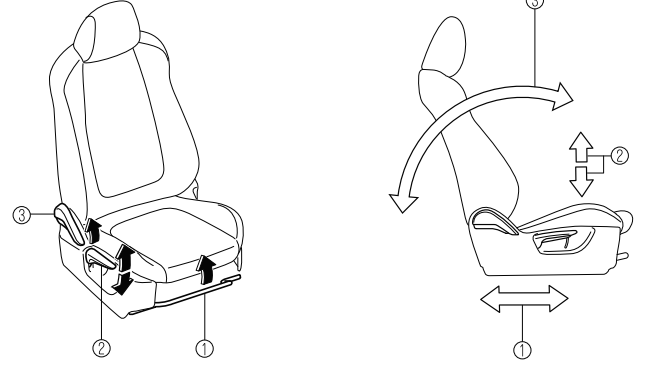
 Seat Slide
To move a seat forward or backward, raise the lever and slide the seat to the desired position and release the lever.
Make sure the lever returns to its original position and the seat is locked in place by attempting to push it forward and backward.
 Height Adjustment
To adjust the seat height, move the lever up or down.
 Seat Recline
To change the seatback angle, lean forward slightly while raising the lever. Then lean back to the desired position and release the lever.
Make sure the lever returns to its original position and the seatback is locked in place by attempting to push it forward and backward.
 Driving Position Memory (Some models)
The desired driving position can be called
up after programming the position.
The following driving positions can be
programmed.
Driver’s seat position (seat slide, height
adjustment, front edge of seat bottom,
seat recline)
Refer to Adjusting the Driver's Seat...
 Rear Seat
..
Other information:
Mazda CX-3 (2015-2026) Owner's Manual: Replacing a Wheel
WARNING Always use wheels of the correct size on your vehicle: Using a wrong-sized wheel is dangerous. Braking and handling could be affected, leading to loss of control and an accident. CAUTION A wrong-sized wheel may adversely affect: Tire fit Wheel and bearing life Ground clearance Snow-chain clearance Speedometer calibration Headlight aim Bumper height Tire Pressure Monitoring System* NOTE When replacing a wheel, make sure the new one is the same as the original factory wheel in diameter, rim width, and offset (inset/outset)...
Mazda CX-3 (2015-2026) Owner's Manual: Recommendations for Shifting
Upshifting For normal acceleration and cruising, Mazda recommends these shift points: *1 Always observe local speed limit regulations. Downshifting When you must slow down in heavy traffic or on a steep upgrade, downshift before the engine starts to overwork...
Categories
- Manuals Home
- Mazda CX-3 Owners Manual
- Mazda CX-3 Service Manual
- Fuel Gauge
- Headlights
- Identification Numbers
- New on site
- Most important about car
Anchor Bracket
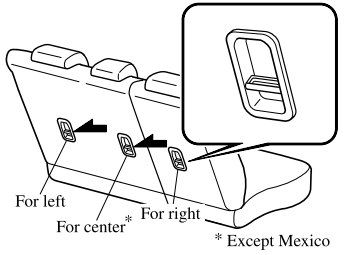
Anchor brackets for securing child-restraint systems are equipped in the vehicle. Locate each anchor position using the illustration.
To install a child-restraint system, remove the head restraint. Always follow the instruction manual accompanying the child-restraint system.
Anchor bracket location
Use the indicated anchor bracket locations when installing a child-restraint system equipped with a tether.