
Mazda CX-3: Bluetooth® / Component Parts
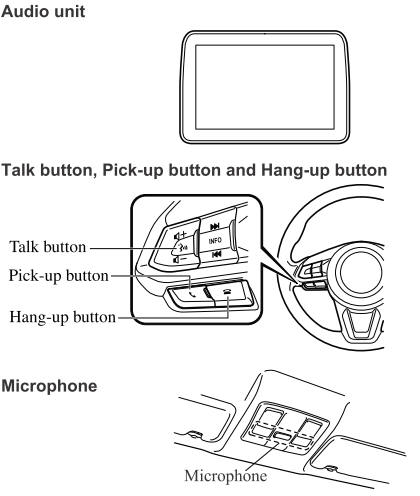
Microphone (hands-free)
The microphone is used for speaking voice commands or when making a Hands-free call.
Talk button
Activates the voice recognition. In addition, it skips the voice guidance.
Pick-up button
Responds to incoming calls. In addition, after selecting a contact or dialing a number, it places the call when the button is pressed.
Hang-up button
Ends the call or refuses an incoming call. In addition, it ends the voice recognition operation.
Commander switch
The commander switch is used for volume adjustment and display operation. Tilt or turn the commander knob to move the cursor. Press the commander knob to select the icon.
Volume adjustment
The volume dial of the commander switch is used to adjust the volume. Turn the dial to the right to increase volume, to the left to decrease it. The volume can also be adjusted using the volume button on the steering wheel.
NOTE
- Press the volume dial to switch the audio MUTE on and off.
- If the volume is lower compared to other audio modes, increase the volume from the device side.
Conversation volume and the volume of the voice guidance and ringtone can each be set in advance.
- Select the
 icon on the
home screen to display the Communication screen.
icon on the
home screen to display the Communication screen. - Select
 .
. - Adjust the
 and the
 using the slider.
 Introduction
Bluetooth® Hands-Free outline
When a Bluetooth® device (mobile phone) is connected to the vehicle's
Bluetooth® unit via
radio wave transmission, a call can be made or received by pressing the talk
button, pick-up
button, or hang-up button on the audio remote control switch, or by operating
the center
display...

Other information:
Mazda CX-3 (2015-2026) Owner's Manual: Tilt/Slide Operation
The moonroof can be opened or closed electrically only when the ignition is switched ON. Before leaving the vehicle or washing your Mazda, make sure the moonroof is completely closed so that water does not get inside the cabin area. After washing your Mazda or after it rains, wipe the water off the moonroof before operating it to avoid water penetration which could cause rust and water damage to your headliner...
Mazda CX-3 (2015-2026) Owner's Manual: Gracenote® Database
When a USB device or Bluetooth® device is connected to this unit and the audio is played, the album name, artist name, genre and title information are automatically displayed if there is a match in the vehicle's database compilation to the music being played...
Categories
- Manuals Home
- Mazda CX-3 Owners Manual
- Mazda CX-3 Service Manual
- Recommended Oil
- Engine Start Function When Key Battery is Dead
- Specifications
- New on site
- Most important about car
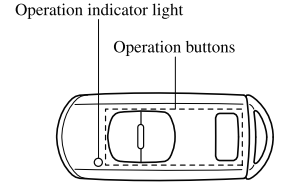
Transmitter
NOTE
The headlights turn on/off by operating the transmitter. Refer to Leaving Home Light. (With theft-deterrent system)The hazard warning lights flash when the theft-deterrent system is armed or turned off. Refer to Theft-Deterrent System.
(With the advanced keyless function)