
Mazda CX-3: Driving Tips / Driving on Uneven Road
Your vehicle's suspension and underbody can be damaged if driven on rough/uneven roads or over speed bumps at excessive speeds. Use care and reduce speed when traveling on rough/uneven roads or over speed bumps.
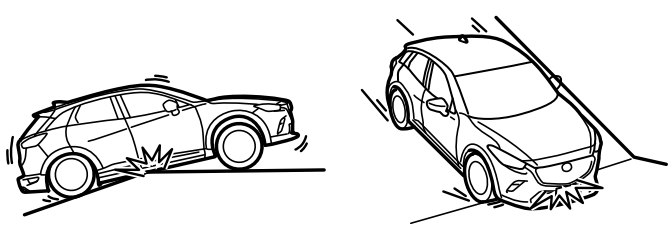
Use care not to damage the vehicle's underbody, bumpers or muffler(s) when driving under the following conditions:
- Ascending or descending a slope with a sharp transition angle
- Ascending or descending a driveway or trailer ramp with a sharp transition angle
This vehicle is equipped with low profile tires allowing class-leading performance and handling. As a result, the sidewall of the tires are very thin and the tires and wheels can be damaged if driven through potholes or on rough/uneven roads at excessive speeds. Use care and reduce speed when traveling on rough/uneven roads or through potholes.
 Overloading
WARNING
Be careful not to overload your vehicle:
The gross axle weight rating (GAWR) and
the gross vehicle weight rating (GVWR) of
the vehicle are on the Motor Vehicle Safety
Standard Label on the driver's door frame...
 Towing
Trailer Towing
Your Mazda is not designed for towing.
Never tow a trailer with your Mazda.
Recreational Towing
An example of "recreational towing" is
towing your vehicle behind a motorhome...
Other information:
Mazda CX-3 (2015-2026) Owner's Manual: Heating
Set the mode selector dial to the position. (Type A)Set the air intake selector to the outside air position. (Type B) Set the air intake selector to the position. Set the temperature control dial to the hot position. Set the fan control dial to the desired speed...
Mazda CX-3 (2015-2026) Owner's Manual: Moonroof (Some models)
The moonroof can be opened or closed when operating the overhead tilt/slide switch at the front seats. WARNING Do not let passengers stand up or extend part of the body through the open moonroof while the vehicle is moving: Extending the head, arms, or other parts of the body through the moonroof is dangerous...
Categories
- Manuals Home
- Mazda CX-3 Owners Manual
- Mazda CX-3 Service Manual
- Trip Computer and INFO Switch (Some models)
- Speedometer
- Indicator Lights
- New on site
- Most important about car
Operational Range
The system operates only when the driver is in the vehicle or within operational range while the key is being carried.
NOTE
When the battery power is low, or in places where there are high-intensity radio waves or noise, the operational range may become narrower or the system may not operate. For determining battery replacement, Refer to Keyless Entry System.
