Mazda CX-3: Advanced Keyless Entry System (Some models) / Operational Range
The system operates only when the driver is in the vehicle or within operational range while the key is being carried.
NOTE
When the battery power is low, or in places where there are high-intensity radio waves or noise, the operational range may become narrower or the system may not operate. For determining battery replacement, Refer to Keyless Entry System.
Locking, Unlocking the Doors and the Liftgate
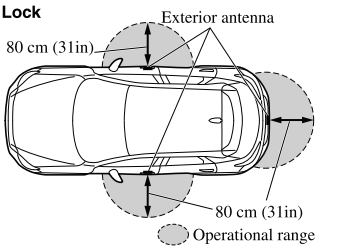
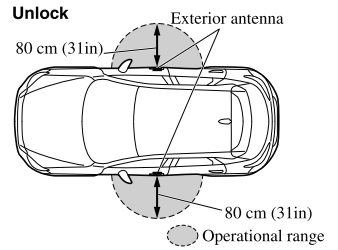
NOTE
- The system may not operate if you are too close to the windows or door handles, or liftgate.
- If the key is left in the following areas
and you leave the vehicle, the doors may
be locked depending on the radio wave
conditions even if the key is left in the
vehicle.
- Around the dashboard
- In the storage compartments such as the glove compartment or the center console
- Next to a communication device such as a mobile phone
Opening the Liftgate
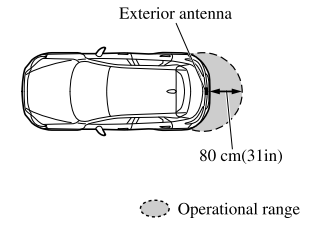
 Advanced Keyless Entry System
WARNING
Radio waves from the key may affect
medical devices such as pacemakers:
Before using the key near people who use
medical devices, ask the medical device
manufacturer or your physician if radio
waves from the key will affect the device...

Other information:
Mazda CX-3 (2015-2026) Owner's Manual: Recommendations for Shifting
Upshifting For normal acceleration, Mazda recommends these shift points: For cruising, Mazda recommends these shift points: Downshifting When you must slow down in heavy traffic or on a steep upgrade, downshift before the engine starts to overwork...
Mazda CX-3 (2015-2026) Owner's Manual: Using ISOFIX Lower Anchor (Mexico)/Using LATCH Lower Anchor (Except Mexico)
Your Mazda is equipped with ISOFIX/LATCH*1 lower anchors for attachment of specially designed ISOFIX/LATCH*1 child-restraint systems in the rear seats. Both anchors must be used, otherwise the seat will bounce around and put the child in danger. Most ISOFIX/ LATCH*1 child-restraint systems must also be used in conjunction with a tether to be effective...
Categories
- Manuals Home
- Mazda CX-3 Owners Manual
- Mazda CX-3 Service Manual
- Odometer, Trip Meter and Trip Meter Selector (Some models)
- Headlights
- How to use the Android Auto™ mode
- New on site
- Most important about car
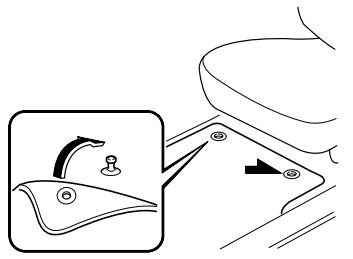
Floor Mat
We recommend the use of Genuine Mazda floor mats.
WARNING
Make sure the floor mats are hooked on the retention pins to prevent them from bunching up under the foot pedals: Using a floor mat that is not secured is dangerous as it will interfere with the accelerator and brake pedal operation, which could result in an accident.
Do not install two floor mats, one on top of the other, on the driver's side: Installing two floor mats, one on top of the other, on the driver's side is dangerous as the retention pins can only keep one floor mat from sliding forward. Loose floor mat(s) will interfere with the foot pedals and could result in an accident. If using an all-weather mat for winter use always remove the original floor mat.