Mazda CX-3: Driving Tips / Floor Mat
We recommend the use of Genuine Mazda floor mats.
WARNING
Make sure the floor mats are hooked on the retention pins to prevent them from bunching up under the foot pedals: Using a floor mat that is not secured is dangerous as it will interfere with the accelerator and brake pedal operation, which could result in an accident.
Do not install two floor mats, one on top of the other, on the driver's side: Installing two floor mats, one on top of the other, on the driver's side is dangerous as the retention pins can only keep one floor mat from sliding forward. Loose floor mat(s) will interfere with the foot pedals and could result in an accident. If using an all-weather mat for winter use always remove the original floor mat.
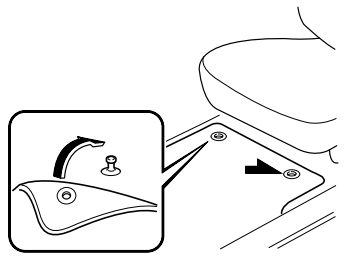
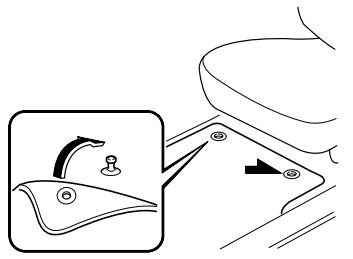
When setting a floor mat, position the floor mat so that its grommets are inserted over the pointed end of the retention posts.
 Hazardous Driving
WARNING
Be extremely careful if it is necessary to
downshift on slippery surfaces:
Downshifting into lower gear while driving
on slippery surfaces is dangerous...
 Rocking the Vehicle
WARNING
Do not spin the wheels at more than 56
km/h (35 mph), and do not allow anyone
to stand behind a wheel when pushing the
vehicle:
When the vehicle is stuck, spinning the
wheels at high speed is dangerous...
Other information:
Mazda CX-3 (2015-2026) Owner's Manual: Tire Maintenance
Improper or inadequate vehicle maintenance can cause tires to wear abnormally. Here are some important maintenance points: Tire Inflation Pressure Inspect all tire pressure monthly (including the spare) when the tires are cold. Maintain recommended pressures for the best ride, top handling, and minimum tire wear...
Mazda CX-3 (2015-2026) Owner's Manual: System Error Activation
When the warning light flashes, there may be a system malfunction. Consult an Authorized Mazda Dealer. A system error activation may occur in the following cases: When there is equipment or a device near the vehicle using the same radio frequency as that of the tire pressure sensors...
Categories
- Manuals Home
- Mazda CX-3 Owners Manual
- Mazda CX-3 Service Manual
- Warning Lights
- Adjusting the Driver's Seat
- Indicator Lights
- New on site
- Most important about car
Floor Mat
We recommend the use of Genuine Mazda floor mats.
WARNING
Make sure the floor mats are hooked on the retention pins to prevent them from bunching up under the foot pedals: Using a floor mat that is not secured is dangerous as it will interfere with the accelerator and brake pedal operation, which could result in an accident.
Do not install two floor mats, one on top of the other, on the driver's side: Installing two floor mats, one on top of the other, on the driver's side is dangerous as the retention pins can only keep one floor mat from sliding forward. Loose floor mat(s) will interfere with the foot pedals and could result in an accident. If using an all-weather mat for winter use always remove the original floor mat.