
Mazda CX-3: Storage Compartments / Overhead Console (Some models)
Mazda CX-3 (2015-2026) Owner's Manual / Interior Features / Interior Equipment / Storage Compartments / Overhead Console (Some models)
This console box is designed to store eyeglasses or other accessories.
Push and release to open.
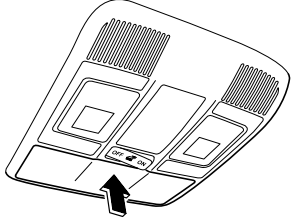
 Storage Compartments
WARNING
Keep storage boxes closed when driving: Driving with the storage
boxes open is
dangerous. To reduce the possibility of
injury in an accident or a sudden stop, keep
the storage boxes closed when driving...

Other information:
Mazda CX-3 (2015-2026) Owner's Manual: Sunlight/Temperature Sensor
Sunlight sensor Do not place objects on the sunlight sensor. Otherwise, the interior temperature may not adjust correctly. Interior temperature sensor Do not cover the interior temperature sensor. Otherwise, the interior temperature may not adjust correctly...
Mazda CX-3 (2015-2026) Owner's Manual: Tire Maintenance
Improper or inadequate vehicle maintenance can cause tires to wear abnormally. Here are some important maintenance points: Tire Inflation Pressure Inspect all tire pressure monthly (including the spare) when the tires are cold. Maintain recommended pressures for the best ride, top handling, and minimum tire wear...
Categories
- Manuals Home
- Mazda CX-3 Owners Manual
- Mazda CX-3 Service Manual
- Headlights
- Exterior Overview
- Specifications
- New on site
- Most important about car
Opening and Closing the Liftgate
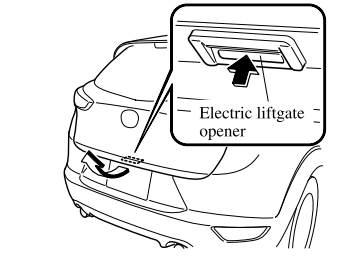
Opening the liftgate with Electric liftgate opener
Unlock the doors and liftgate, then press the electric liftgate opener on the liftgate and raise the liftgate when the latch releases.

Copyright © 2026 www.macx3.net