
Mazda CX-3: If Trouble Arises / Active Driving Display Does Not Operate
Mazda CX-3 (2015-2026) Owner's Manual / If Trouble Arises / Active Driving Display Does Not Operate
If the active driving display does not operate, switch the ignition off and then restart the engine. If the active driving display does not operate even with the engine restarted, have the vehicle inspected at an Authorized Mazda Dealer.
 When Liftgate Cannot be Opened
If the vehicle battery is dead, the liftgate
cannot be unlocked and opened.
In this case, the liftgate can be unlocked
by taking care of the dead battery
situation...

Other information:
Mazda CX-3 (2015-2026) Owner's Manual: Switching to Bluetooth® audio mode
To listen to music or voice audio recorded to a Bluetooth® audio device, switch to the Bluetooth® audio mode to operate the audio device using the audio system control panel. Any Bluetooth® audio device must be paired to the vehicle's Bluetooth® unit before it can be used...
Mazda CX-3 (2015-2026) Owner's Manual: Pregnant Women and Persons with Serious Medical Conditions
Pregnant women should always wear seat belts. Ask your doctor for specific recommendations. The lap belt should be worn SNUGLY AND AS LOW AS POSSIBLE OVER THE HIPS. The shoulder belt should be worn across your shoulder properly, but never across the stomach area...
Categories
- Manuals Home
- Mazda CX-3 Owners Manual
- Mazda CX-3 Service Manual
- Headlights
- Daytime Running Lights
- Adjusting the Driver's Seat
- New on site
- Most important about car
Opening and Closing the Liftgate
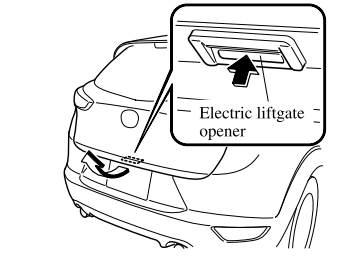
Opening the liftgate with Electric liftgate opener
Unlock the doors and liftgate, then press the electric liftgate opener on the liftgate and raise the liftgate when the latch releases.

Copyright © 2026 www.macx3.net