
Mazda CX-3: When Driving / Drive Selection
Drive selection is a system to switch the vehicle's drive mode. When the sport mode is selected, vehicle's response against accelerator operation is enhanced. This provides additional quick acceleration which may be needed to safely make maneuvers such as lane changes, merging onto freeways, or passing other vehicles.
CAUTION
Do not use the sport mode when driving on slippery roads such as wet or snow-covered roads. It may cause tire slipping.
NOTE
- When the sport mode is selected, driving at higher engine speeds increases and it may increase fuel consumption. Mazda recommends that you cancel the sport mode on normal driving.
- Drive mode cannot be switched in the following conditions:
- ABS/TCS/DSC is operating
- The Mazda Radar Cruise Control with Stop & Go function (MRCC with Stop & Go function) System/cruise control is operating.
- Steering wheel is being operated abruptly
Drive Selection Switch
Press the drive selection switch forward
 to select the sport mode.
Pull the drive selection switch back
to select the sport mode.
Pull the drive selection switch back
 to cancel the sport mode.
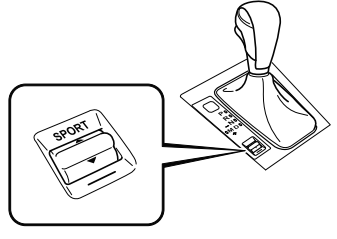
- NOTE
- In the following cases, the drive
selection is canceled.
- The ignition is switched OFF.
- Mazda Radar Cruise Control with Stop & Go function (MRCC with Stop & Go function) System/cruise control is set.
- Depending on the driving conditions when sport mode is selected, the vehicle may perform shift-down or slightly accelerate.
Select Mode Indicator Light
When the sport mode is selected, the select mode indicator light turns on in the instrument cluster.

NOTE
If the drive selection cannot be switched to sport mode, the select mode indicator light flashes to notify the driver.
 Fuel Economy Data Reset and Trip Meter (TRIP A) Synchronization (Linking)
Because the average fuel economy indication on the instrument cluster display
is linked
with the “Average Fuel Economy History” (Current) indication on the center
display, when
one is reset the other is also reset...
 i-ACTIV AWD
i-ACTIV AWD Operation (Some models)
AWD provides excellent drivability on
snow-covered and ice-packed roads, sand
and mud, as well as on steep slopes and
other slippery surfaces...
Other information:
Mazda CX-3 (2015-2026) Owner's Manual: Clock
Setting the time The clock can be set at any time when the ignition is switched to ACC or ON. To adjust the time, press the clock button for about 2 seconds until a beep is heard. The clock's current time will flash.Time adjustment To adjust the time, press the hour/ minute set button while the clock's current time is flashing...
Mazda CX-3 (2015-2026) Owner's Manual: Starting the Engine
WARNING Radio waves from the key may affect medical devices such as pacemakers: Before using the key near people who use medical devices, ask the medical device manufacturer or your physician if radio waves from the key will affect the device. NOTE The key must be carried because the key carries an immobilizer chip that must communicate with the engine controls at short range...
Categories
- Manuals Home
- Mazda CX-3 Owners Manual
- Mazda CX-3 Service Manual
- Indicator Lights
- Engine Start Function When Key Battery is Dead
- Mazda Radar Cruise Control with Stop & Go function (MRCC with Stop & Go function) Display Indication
- New on site
- Most important about car
Operational Range
The system operates only when the driver is in the vehicle or within operational range while the key is being carried.
NOTE
When the battery power is low, or in places where there are high-intensity radio waves or noise, the operational range may become narrower or the system may not operate. For determining battery replacement, Refer to Keyless Entry System.
