
Mazda CX-3: Before Driving / Keys

 KEYS
KEYS
WARNING
Do not leave the key in your vehicle with
children and keep them in a place where
your children will not find or play with
them:
Leaving children in a vehicle with the key is
dangerous...
Other information:
Mazda CX-3 (2015-2026) Owner's Manual: Bluetooth® Audio Device Information Display
If a Bluetooth® audio device is connected, the following information is displayed in the center display. X: Available — : Not available NOTE Some information may not display depending on the device, and if the information cannot be displayed, “Unknown - - -” is indicated...
Mazda CX-3 (2015-2026) Owner's Manual: Locking, Unlocking with Door-Lock Knob
Operation from inside To lock any door from the inside, press the door-lock knob. To unlock, pull it outward. This does not operate the other door locks. Operation from outside To lock any door using its door-lock knob from the outside, press the door-lock knob to the lock position and close the door (holding the door handle in the open position is not required)...
Categories
- Manuals Home
- Mazda CX-3 Owners Manual
- Mazda CX-3 Service Manual
- Trip Computer and INFO Switch (Some models)
- Adjusting the Driver's Seat
- Fuel Gauge
- New on site
- Most important about car
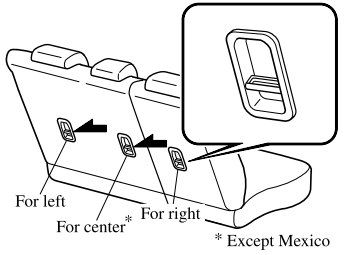
Anchor Bracket
Anchor brackets for securing child-restraint systems are equipped in the vehicle. Locate each anchor position using the illustration.
To install a child-restraint system, remove the head restraint. Always follow the instruction manual accompanying the child-restraint system.
Anchor bracket location
Use the indicated anchor bracket locations when installing a child-restraint system equipped with a tether.

Copyright © 2026 www.macx3.net