
Mazda CX-3: Appendix / Operating Tips for iPod
This unit supports playback of music files recorded to an iPod.
* iPod is a trademark of Apple Inc., registered in the U.S. and other countries.
The iPod may not be compatible depending on the model or OS version. In this case, an error message is displayed.
CAUTION
- Remove the iPod when it is not in use. Because the iPod is not designed to withstand excessive changes in temperature inside the cabin, it could be damaged or the battery may deteriorate due to the excessive temperature or humidity inside the cabin if it is left in the vehicle.
- If data in the iPod is lost while it is connected to the unit, Mazda cannot guarantee recovery of any lost data.
- If the iPod battery is deteriorated, the iPod may not recharge and playback may not be possible when it is connected to the unit.
- For details on using the iPod, refer to the iPod instruction manual.
- When connecting the iPod to a USB port, all commands are made from the audio unit. iPod control is not possible.
NOTE
The audio unit cannot display images or videos stored in an iPod.
 Operating Tips for USB device
This unit plays audio files as follows:
CAUTION
Do not use an audio file extension on files
other than audio files. In addition, do not
change the audio file extension...
 Agreements and disclaimers related to Apple CarPlay™
This unit is compatible with Apple
CarPlay™ which can operate an iPhone®
using the vehicle's audio device.
* iPhone, Siri and Apple Music are
registered trademarks of Apple Inc...
Other information:
Mazda CX-3 (2015-2026) Owner's Manual: Component Parts
Audio unit Talk button, Pick-up button and Hang-up button Microphone Microphone (hands-free) The microphone is used for speaking voice commands or when making a Hands-free call. Talk button Activates the voice recognition. In addition, it skips the voice guidance...
Mazda CX-3 (2015-2026) Owner's Manual: Playback
Select the icon on the home screen to display the Entertainment screen. When is selected, the following icons are indicated in the bottom part of the center display. Station list Select the icon to display the station list. Favorites station name: Select to display the program registered to your favorites...
Categories
- Manuals Home
- Mazda CX-3 Owners Manual
- Mazda CX-3 Service Manual
- Auto Lock/Unlock Function
- Headlights
- Speedometer
- New on site
- Most important about car
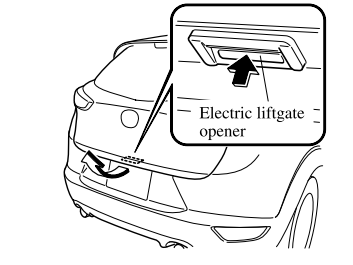
Opening and Closing the Liftgate
Opening the liftgate with Electric liftgate opener
Unlock the doors and liftgate, then press the electric liftgate opener on the liftgate and raise the liftgate when the latch releases.

Copyright © 2026 www.macx3.net