
Mazda CX-3: Climate Control System / Operating Tips
- Operate the climate control system with the engine running.
- To prevent the battery from being discharged, do not leave the fan control dial on for a long period of time with the ignition switched ON when the engine is not running.
- Clear all obstructions such as leaves, snow and ice from the hood and the air inlet in the cowl grille to improve the system efficiency.
- Use the climate control system to defog the windows and dehumidify the air.
- The recirculate mode should be used when driving through tunnels or while in a traffic jam, or when you would like to shut off outside air for quick cooling of the interior.
- The recirculate mode should be used when driving through tunnels or while in a traffic jam, or when you would like to shut off outside air for quick cooling of the interior.
- Use the outside air position for ventilation or windshield defrosting.
- If the vehicle has been parked in direct sunlight during hot weather, open the windows to let warm air escape, then run the climate control system.
- Run the air conditioner about 10 minutes at least once a month to keep internal parts lubricated.
- Have the air conditioner checked before the weather gets hot. Lack of refrigerant may make the air conditioner less efficient.
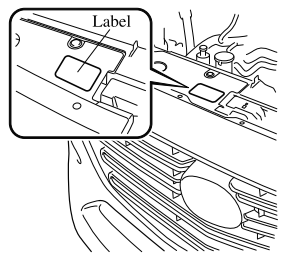
- The refrigerant specifications are indicated on a label attached to the inside of the engine compartment. If the wrong type of refrigerant is used, it could result in a serious malfunction of the air conditioner. Consult a professional, government certified repairer for the inspection or repair because a special device is required for the air conditioner maintenance. For details, consult an Authorized Mazda Dealer.


Other information:
Mazda CX-3 (2015-2026) Owner's Manual: Control Switches
Temperature control dial This dial controls temperature. Turn it clockwise for hot and counterclockwise for cold. NOTE (Type A) When the mode is set to or with the fan control dial in a position other than 0 and the temperature control dial in the maximum cold position, the air intake selector switches to the recirculated air position and the A/C turns on automatically...
Mazda CX-3 (2015-2026) Owner's Manual: Recording of Vehicle Data
This vehicle is equipped with a computer which records the following main vehicle data related to vehicle controls, operation, and other driving conditions. Recorded data Vehicle conditions such as engine speed and vehicle speed Driving operation conditions such as accelerator and brake pedals, and information related to the environmental circumstances while the vehicle is driven Malfunction diagnosis information from each on-vehicle computer Information related to controls of other on-vehicle computers NOTE The recorded data may vary depending on the vehicle grade and optional equipment...
Categories
- Manuals Home
- Mazda CX-3 Owners Manual
- Mazda CX-3 Service Manual
- When Driving
- Indicator Lights
- Auto Lock/Unlock Function
- New on site
- Most important about car
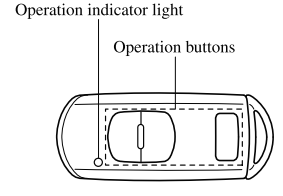
Transmitter
NOTE
The headlights turn on/off by operating the transmitter. Refer to Leaving Home Light. (With theft-deterrent system)The hazard warning lights flash when the theft-deterrent system is armed or turned off. Refer to Theft-Deterrent System.
(With the advanced keyless function)
Copyright © 2026 www.macx3.net