
Mazda CX-3: Interior Features / Climate Control System
Mazda CX-3 (2015-2026) Owner's Manual / Interior Features / Climate Control System

 Operating Tips
Operate the climate control system with
the engine running.
To prevent the battery from being
discharged, do not leave the fan control
dial on for a long period of time with the
ignition switched ON when the engine is
not running...
Other information:
Mazda CX-3 (2015-2026) Owner's Manual: Component Parts
Microphone (hands-free) The microphone is used for speaking voice commands or when making a Hands-free call. Talk button Activates the voice recognition. In addition, it skips the voice guidance. Pick-up button Responds to incoming calls. In addition, after selecting a contact or dialing a number, it places the call when the button is pressed...
Mazda CX-3 (2015-2026) Owner's Manual: Using ISOFIX Lower Anchor (Mexico)/Using LATCH Lower Anchor (Except Mexico)
Your Mazda is equipped with ISOFIX/LATCH*1 lower anchors for attachment of specially designed ISOFIX/LATCH*1 child-restraint systems in the rear seats. Both anchors must be used, otherwise the seat will bounce around and put the child in danger. Most ISOFIX/ LATCH*1 child-restraint systems must also be used in conjunction with a tether to be effective...
Categories
- Manuals Home
- Mazda CX-3 Owners Manual
- Mazda CX-3 Service Manual
- Key Battery Replacement
- Identification Numbers
- Odometer, Trip Meter and Trip Meter Selector (Some models)
- New on site
- Most important about car
Anchor Bracket
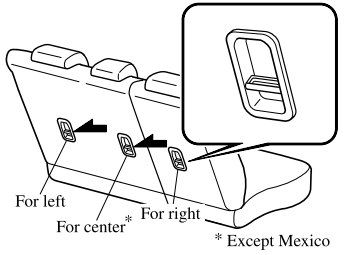
Anchor brackets for securing child-restraint systems are equipped in the vehicle. Locate each anchor position using the illustration.
To install a child-restraint system, remove the head restraint. Always follow the instruction manual accompanying the child-restraint system.
Anchor bracket location
Use the indicated anchor bracket locations when installing a child-restraint system equipped with a tether.

Copyright © 2026 www.macx3.net