Mazda CX-3: Appendix / Operating Tips for MP3
MP3 stands for MPEG Audio Layer 3, which is standardized voice compression established by the ISO working group (MPEG).
Use of MP3 allows for audio data to be compressed to approximately a tenth of the source data size.
This unit plays files with the extension (.mp3) as MP3 files.
CAUTION
Do not use an audio file extension on files other than audio files. In addition, do not change the audio file extension. Otherwise, the unit will not recognize the file correctly resulting in noise or a malfunction.
NOTE
Supply of this product only conveys a license for private, non-commercial use and does not convey a license nor imply any right to use this product in any commercial (i.e. revenue-generating) real time broadcasting (terrestrial, satellite, cable and/or any other media), broadcasting/streaming via the Internet, intranets and/or other networks or in other electronic content distribution systems, such as pay-audio or audio-on-demand applications. An independent license for such use is required. For details, please visit http://www.mp3licensing.com.
When naming an MP3 file, be sure to add an MP3 file extension (.mp3) after the file name.
The number of characters which can be displayed is restricted.
 Radio Reception
AM characteristics
AM signals bend around such things as
buildings or mountains and bounce off the
ionosphere.
Therefore, they can reach longer distances
than FM signals...
 Operating Tips for WMA
WMA is short for Windows Media
Audio and is the audio compression
format used by Microsoft.
Audio data can be created and stored at a
higher compression ratio than MP3...
Other information:
Mazda CX-3 (2015-2026) Owner's Manual: Schedule 1
Chart symbols: I: Inspect: Inspect and clean, repair, adjust, fill up, or replace if necessary. R: Replace L: Lubricate C: Clean T: Tighten D: Drain Remarks: *1 Use of FL-22 is recommended when replacing engine coolant. Using engine coolant other than FL-22 may cause serious damage to the engine and cooling system...
Mazda CX-3 (2015-2026) Owner's Manual: Snow Tires
Use snow tires on all 4 wheels Do not go faster than 120 km/h (75 mph) while driving with snow tires. Inflate snow tires 30 kPa (0.3 kgf/cm2, 4.3 psi) more than recommended on the tire pressure label (driver's door frame), but never more than the maximum cold-tire pressure shown on the tires...
Categories
- Manuals Home
- Mazda CX-3 Owners Manual
- Mazda CX-3 Service Manual
- Fuel Gauge
- When Driving
- Adjusting the Driver's Seat
- New on site
- Most important about car
Floor Mat
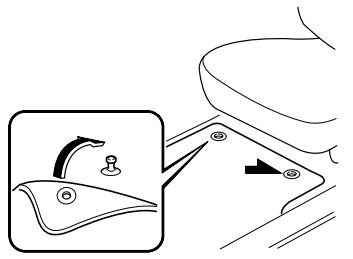
We recommend the use of Genuine Mazda floor mats.
WARNING
Make sure the floor mats are hooked on the retention pins to prevent them from bunching up under the foot pedals: Using a floor mat that is not secured is dangerous as it will interfere with the accelerator and brake pedal operation, which could result in an accident.
Do not install two floor mats, one on top of the other, on the driver's side: Installing two floor mats, one on top of the other, on the driver's side is dangerous as the retention pins can only keep one floor mat from sliding forward. Loose floor mat(s) will interfere with the foot pedals and could result in an accident. If using an all-weather mat for winter use always remove the original floor mat.