Mazda CX-3: Bluetooth® Hands-Free / Call interrupt
A call can be interrupted to receive an incoming call from a third party. Switch to a new incoming call using the following methods.
(Method 1)
- Press the pick-up button.
- Prompt: “Swapping calls.”
(Method 2)
Press the talk button with a short press.
Say: [Beep] “Swap calls”
Prompt: “Swapping calls.”
NOTE
- To refuse an incoming call, press the hang-up button.
- After receiving a new incoming call, the previous call is placed on hold.
Switching calls
Switching back to the previous call can also be done.
Method 1
- Press the pick-up button.
- Prompt: “Swapping calls.”
Method 2
- Press the talk button with a short press.
- Say: [Beep] “Swap calls”
- Prompt: “Swapping calls.”
Three-way call function
- Press the talk button with a short press.
- Say: [Beep] “Join calls”
- Prompt: “Joining calls”
Making a call using a telephone number
- Press the talk button with a short press.
- Say: [Beep] “Dial”
- Prompt: “Number, please”
- Say: [Beep] “XXXXXXXXXXX (Telephone number)”
- Prompt: “XXXXXXXXXXX. (Telephone number) After the beep, continue to add numbers, or say Go-Back to re-enter the last entered numbers, or press the Pick-Up button to execute dialing.”
- (Dialing)
Press the pick-up button or say “Dial”, then go to Step 7.
(Adding/inputting telephone number)
Say, “XXXX” (desired telephone number), then go to Step 5.
(Telephone number correction)
Say, “Go Back”. The prompt replies, “Go Back. The last entered numbers have been removed.”. Then go back to Step 3.
- Prompt: “Dialing”
Making calls using the phonebook
- Press the talk button with a short press.
- Say: [Beep] “Call”
- Prompt: “Name please.”
- Say: [Beep] “XXXXX... (Ex. “John's phone”)” (Say a voice tag registered in the phonebook.)
- Prompt: “Calling XXXXX... (Ex. “John's phone”) XXXX (Ex. “at home”). Is this correct?” (Voice tag and phone number location registered in phonebook).
- Say: [Beep] “Yes”
- Prompt: “Dialing”
Redialing function
- Press the talk button with a short press.
- Say: [Beep] “Redial”
- Prompt: “Dialing”
Ending the current call
Press the hang-up button during the call.

 DTMF (Dual Tone Multi-Frequency Signal) Transmission
This function is used when transmitting
DTMF via the user's voice. The receiver of
a DTMF transmission is generally a home
telephone answering machine or a
company's automated guidance call center
(When you send tone signals back
according to the voice guidance
recording)...
Other information:
Mazda CX-3 (2015-2026) Owner's Manual: Transaxle Ranges
The shift position indication in the instrument cluster illuminates. Refer to Warning/Indicator Lights. The selector lever must be in P or N position to operate the starter. P (Park) P locks the transaxle and prevents the front wheels from rotating...
Mazda CX-3 (2015-2026) Owner's Manual: Tire Rotation
WARNING Rotate tires periodically: Irregular tire wear is dangerous. To equalize tread wear for maintaining good performance in handling and braking, rotate the tires every 12,000 km (7,500 miles). However Mazda recommends to rotate every 8,000 km (5,000 miles) to help increase tire life and distribute wear more evenly...
Categories
- Manuals Home
- Mazda CX-3 Owners Manual
- Mazda CX-3 Service Manual
- Recommended Oil
- Odometer, Trip Meter and Trip Meter Selector (Some models)
- Trip Computer and INFO Switch (Some models)
- New on site
- Most important about car
Fuel Gauge
The fuel gauge shows approximately how much fuel is remaining in the tank when the ignition is switched ON. We recommend keeping the tank over 1/4 full.
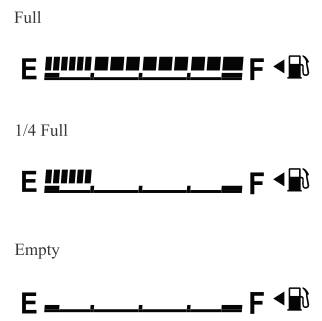
If the low fuel warning light illuminates or the fuel level is very low, refuel as soon as possible.
If inconsistency in engine performance or stalling occurs due to low fuel level conditions, refuel the vehicle as soon as possible and add at least 10 L (2.7 US gal, 2.2 Imp gal) of fuel. Refer to Taking Action.
