
Mazda CX-3: Storage Compartments / Center Console
Mazda CX-3 (2015-2026) Owner's Manual / Interior Features / Interior Equipment / Storage Compartments / Center Console
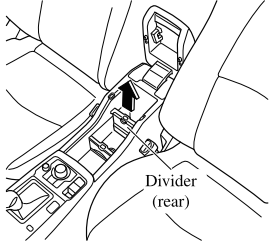
The rear divider can be removed and stored.
Removing the divider provides a console box with a wider space.
- Pull out the divider.
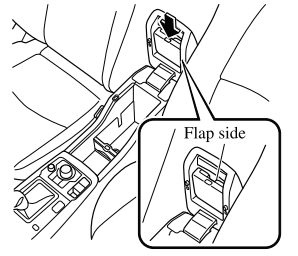
- Insert the divider into the armrest from
the top with the flap side of the divider
facing the underside of the armrest,
and press it in until a click sound is
heard.
NOTE
To use the divider, install it in the reverse order of removal.

 Cargo Securing Loops
Use the loops in the luggage compartment
to secure cargo with a rope or net. The
tensile strength of the loops is 196 N (20 kgf, 44 lbf). Do not apply excessive
force
to the loops as it will damage them...
Other information:
Mazda CX-3 (2015-2026) Owner's Manual: Playback
To listen to a Bluetooth® audio device over the vehicle's speaker system, switch the mode to Bluetooth® audio mode. (Refer to “Switching to Bluetooth® audio mode”) To stop playback, press the Play/Pause button (4). Press the button again to resume playback...
Mazda CX-3 (2015-2026) Owner's Manual: Activation/Deactivation
To activate the system, press the ON switch. The cruise main indication (white) is displayed. To deactivate the system, press the OFF/CAN switch. The cruise main indication (white) turns off. WARNING lways turn off the cruise control system when it is not in use: Leaving the cruise control system in an activation-ready state while the cruise control is not in use is dangerous as the cruise control could unexpectedly activate if the activation button is accidentally pressed, and result in loss of vehicle control and an accident...
Categories
- Manuals Home
- Mazda CX-3 Owners Manual
- Mazda CX-3 Service Manual
- TCS OFF Switch
- Identification Numbers
- Daytime Running Lights
- New on site
- Most important about car
Operational Range
The system operates only when the driver is in the vehicle or within operational range while the key is being carried.
NOTE
When the battery power is low, or in places where there are high-intensity radio waves or noise, the operational range may become narrower or the system may not operate. For determining battery replacement, Refer to Keyless Entry System.

Copyright © 2026 www.macx3.net