
Mazda CX-3: Fuel and Emission / Fuel and Engine Exhaust Precautions
Mazda CX-3 (2015-2026) Owner's Manual / Before Driving / Fuel and Emission / Fuel and Engine Exhaust Precautions

 Fuel Requirements
Vehicles with catalytic converters or oxygen sensors must use ONLY UNLEADED
FUEL, which will reduce exhaust emissions and keep spark plug fouling to a
minimum...
Other information:
Mazda CX-3 (2015-2026) Owner's Manual: Identification Numbers
Vehicle Identification Number The vehicle identification number legally identifies your vehicle. The number is on a plate attached to the cowl panel located on the left corner of the dashboard. This plate can easily be seen through the windshield...
Mazda CX-3 (2015-2026) Owner's Manual: Manual Shift Mode
The manual shift mode gives you the feel of driving a manual transaxle vehicle by allowing you to operate the selector lever manually. This allows you to control engine rpm and torque to the drive wheels much like a manual transaxle when more control is desired...
Categories
- Manuals Home
- Mazda CX-3 Owners Manual
- Mazda CX-3 Service Manual
- Recommended Oil
- TCS OFF Switch
- Speedometer
- New on site
- Most important about car
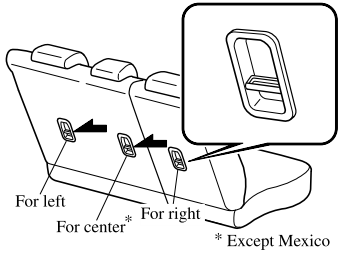
Anchor Bracket
Anchor brackets for securing child-restraint systems are equipped in the vehicle. Locate each anchor position using the illustration.
To install a child-restraint system, remove the head restraint. Always follow the instruction manual accompanying the child-restraint system.
Anchor bracket location
Use the indicated anchor bracket locations when installing a child-restraint system equipped with a tether.

Copyright © 2026 www.macx3.net