Mazda CX-3: i-ACTIVSENSE / High Beam Control System (HBC)(Some models)
The HBC determines the conditions in front of the vehicle using the Forward Sensing Camera (FSC) while driving in darkness to automatically switch the headlights between high and low beams.
Refer to Forward Sensing Camera (FSC).
While driving the vehicle at a speed of about 30 km/h (19 mph) or more, the headlights are switched to high beams when there are no vehicles ahead or approaching in the opposite direction.
The system switches the headlights to low beams when one of the following occurs:
- The system detects a vehicle or the headlights/lights of a vehicle approaching in the opposite direction.
- The vehicle is driven on roads lined with streetlamps or on roads in well-lit cities and towns.
- The vehicle is driven at less than about 20 km/h (12 mph).
The warning light turns on when the system has a malfunction. Refer to Contact Authorized Mazda Dealer and Have Vehicle Inspected on page.
CAUTION
- Do not adjust the vehicle height, modify the headlight units, or remove the camera, otherwise the system will not operate normally.
- Do not rely excessively on the HBC and drive the vehicle while paying sufficient attention to safety. Switch the headlights between the high beams and low beams manually if necessary.
NOTE
The timing in which the system switches the headlights changes under the following conditions. If the system does not switch the headlights appropriately, manually switch between high and low beams according to the visibility as well as road and traffic conditions.
- When there are sources of light in the area such as street lamps, illuminated signboards, and traffic signals.
- When there are reflective objects in the surrounding area such as reflective plates and signs.
- When visibility is reduced under rain, snow and foggy conditions.
- When driving on roads with sharp turn or hilly terrain.
- When the headlights/rear lamps of vehicles in front of you or in the opposite lane are dim or not illuminated.
- When there is sufficient darkness such as at dawn or dusk.
- When the luggage compartment is loaded with heavy objects or the rear passenger seats are occupied.
- When visibility is reduced due to a vehicle in front of you spraying water from its tires onto your windshield.
To Operate the System
The HBC operates to switch the headlights automatically between high and low beams after the ignition is switched ON and the headlight switch is in the AUTO and high beam position.
The HBC determines that it is dark based on the brightness of the surrounding area. At the same time, the HBC indicator light (green) in the instrument cluster illuminates.

The HBC determines that it is dark based on the brightness of the surrounding area.
NOTE
- When the vehicle speed is about 30 km/h (19 mph) or more, the headlights automatically switch to high beams when there are no vehicles ahead or approaching in the opposite direction. When the vehicle speed is less than about 20 km/h (12 mph), the HBC switches the headlights to low beams.
- The low beams may not switch to high beams when cornering.
- Operation of the HBC function can be disabled. Refer to Personalization Features.
Manual Switching
Switching to low beams
Shift the lever to the low beam position. The HBC indicator light (green) turns off.
Switching to high beams
Turn the headlight switch to the  position.
The HBC indicator light (green) turns off
and the  is illuminated.
 Adaptive Front Lighting System (AFS)(Some models)
The adaptive front lighting system (AFS) automatically adjusts the headlight
beams to the
left or right in conjunction with the operation of the steering wheel after the
headlights have
been turned on and the vehicle speed is about 2 km/h (2 mph) or higher...
 Lane Departure Warning System (LDWS)(Some models)
The LDWS notifies the driver that the vehicle may be deviating from its lane.
The system detects the white or yellow lines on the traffic lane using the
Forward Sensing
Camera (FSC) and if it determines that the vehicle may be deviating from its
lane, it notifies
the driver using the active driving display (vehicles with active driving
display), and by
flashing the LDWS warning light and activating the LDWS warning beep...
Other information:
Mazda CX-3 (2015-2026) Owner's Manual: Uniform Tire Quality Grading System (UTQGS)
This information relates to the tire grading system developed by the U.S. National Highway Traffic Safety Administration for grading tires by tread wear, traction, and temperature performance. Tread Wear The tread wear grade is a comparative rating based on the wear rate of the tire when tested under controlled conditions on a specified government test course...
Mazda CX-3 (2015-2026) Owner's Manual: Fastening the Seat Belt
Position the lap belt as low as possible, not on the abdominal area, then adjust the shoulder belt so that it fits snugly against your body. Before fastening the rear seat belt, make sure that the seat belt passes through the seat belt guide correctly and it is not twisted...
Categories
- Manuals Home
- Mazda CX-3 Owners Manual
- Mazda CX-3 Service Manual
- Mazda Radar Cruise Control with Stop & Go function (MRCC with Stop & Go function) Display Indication
- Daytime Running Lights
- Adjusting the Driver's Seat
- New on site
- Most important about car
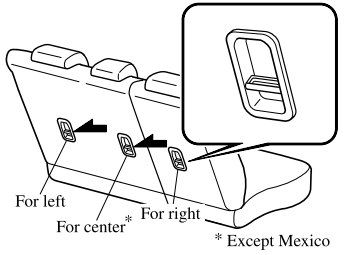
Anchor Bracket
Anchor brackets for securing child-restraint systems are equipped in the vehicle. Locate each anchor position using the illustration.
To install a child-restraint system, remove the head restraint. Always follow the instruction manual accompanying the child-restraint system.
Anchor bracket location
Use the indicated anchor bracket locations when installing a child-restraint system equipped with a tether.