Mazda CX-3: Power Windows / Opening/Closing Windows
The window opens while the switch is pressed and it closes while the switch is pulled up with the ignition switched ON. Do not open or close three or more windows at the same time.
The front passenger's side and rear windows can be opened/closed when the power window lock switch on the driver's door is in the unlock position. Keep this switch in the locked position while children are in the vehicle.
Детальная информация терминал эвотор цена тут.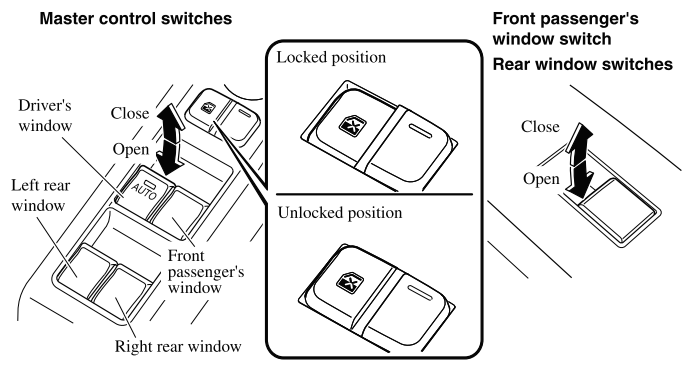
NOTE
- A power window may no longer open/close if you continue to press the switch after fully opening/closing the power window. If the power window does not open/close, wait a moment and then operate the switch again.
- The passenger windows may be opened or closed using the master control switches on the driver's door.
- The power window can be operated for about 40 seconds after the
ignition is switched
from ON to ACC or off with all doors closed. If any door is opened, the
power window
will stop operating.
For engine-off operation of the power window, the switch must be held up firmly throughout window closure because the auto-closing function will be inoperable.
 Power Windows
The windows can be opened/closed by operating the power window switches.
WARNING
Make sure the opening is clear before closing a window:
Closing a power window is dangerous...
 Auto-opening/Closing
To fully open the window automatically,
press the switch completely down, then
release. The window will fully open
automatically.
To fully close the window automatically,
pull the switch completely up, then
release...
Other information:
Mazda CX-3 (2015-2026) Owner's Manual: When Liftgate Cannot be Opened
If the vehicle battery is dead, the liftgate cannot be unlocked and opened. In this case, the liftgate can be unlocked by taking care of the dead battery situation. Refer to Jump-Starting. If the liftgate cannot be unlocked even if the dead battery situation has been resolved, the electrical system may have a malfunction...
Mazda CX-3 (2015-2026) Owner's Manual: Replacing Rear Window Wiper Blade
When the wiper no longer cleans well, the blade is probably worn or cracked. Replace it. CAUTION To prevent damage to the wiper arm and other components, do not move the wiper by hand. Remove the cover. Remove the stopper and raise the wiper arm...
Categories
- Manuals Home
- Mazda CX-3 Owners Manual
- Mazda CX-3 Service Manual
- Recommended Oil
- Daytime Running Lights
- Key Battery Replacement
- New on site
- Most important about car
Anchor Bracket
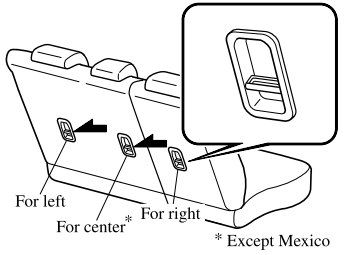
Anchor brackets for securing child-restraint systems are equipped in the vehicle. Locate each anchor position using the illustration.
To install a child-restraint system, remove the head restraint. Always follow the instruction manual accompanying the child-restraint system.
Anchor bracket location
Use the indicated anchor bracket locations when installing a child-restraint system equipped with a tether.