
Mazda CX-3: Power Windows / Auto-opening/Closing
To fully open the window automatically, press the switch completely down, then release. The window will fully open automatically.
To fully close the window automatically, pull the switch completely up, then release. The window will fully close automatically.
To stop the window partway, pull or press the switch in the opposite direction and then release it. This function is only equipped on the driver's side.
NOTE
Power window system initialization procedure
If the battery was disconnected during vehicle maintenance, or for other reasons (such as a switch continues to be operated after the window is fully open/closed), the window will not fully open and close automatically.
The power window auto function will only resume on a power window that has been reset.
- Switch the ignition ON.
- Make sure that the power window lock switch located on the driver's door is not depressed.
- Press the switch and fully open the window.
- Pull up the switch to fully close the window and continue holding the switch for about 2 seconds after the window fully closed.
- Make sure that the power windows operate correctly using the door switches.
 Opening/Closing Windows
The window opens while the switch is pressed and it closes while the switch
is pulled up
with the ignition switched ON. Do not open or close three or more windows at the
same
time...
 Jam-safe Window
If foreign matter is detected between the
window and the window frame while the
window is closing automatically (refer to
Auto-opening/Closing on page 3-30), the
window stops closing and automatically
opens partway...
Other information:
Mazda CX-3 (2015-2026) Owner's Manual: Error Indications
If you see an error indication on the display, take appropriate action according to the following methods. If you cannot clear the error indication, take the vehicle to an Authorized Mazda Dealer. CHECK USB When the message “CHECK USB” is displayed, it indicates that there is some error in the USB device...
Mazda CX-3 (2015-2026) Owner's Manual: Deleting a device
Selecting and deleting devices Select the icon on the home screen to display the Settings screen. Select the tab. Select . Turn the Bluetooth® setting on. Select the device name which you would like to delete. Select . Select . Deleting all devices Select the icon on the home screen to display the Settings screen...
Categories
- Manuals Home
- Mazda CX-3 Owners Manual
- Mazda CX-3 Service Manual
- When Driving
- Trip Computer and INFO Switch (Some models)
- Adjusting the Driver's Seat
- New on site
- Most important about car
Transmitter
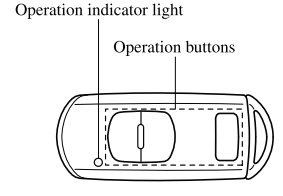
NOTE
The headlights turn on/off by operating the transmitter. Refer to Leaving Home Light. (With theft-deterrent system)The hazard warning lights flash when the theft-deterrent system is armed or turned off. Refer to Theft-Deterrent System.
(With the advanced keyless function)