
Mazda CX-3: Bluetooth® Hands-Free / Receiving an Incoming Call
When an incoming call is received, the incoming call notification screen is displayed. The “Incoming Call Notifications” setting must be on.
Refer to Communication Settings.
To accept the call, press the pick-up button on the audio control switch or
select  on
the screen.
on
the screen.
To reject the call, press the hang-up button on the audio control switch or
select  on the
screen.
on the
screen.
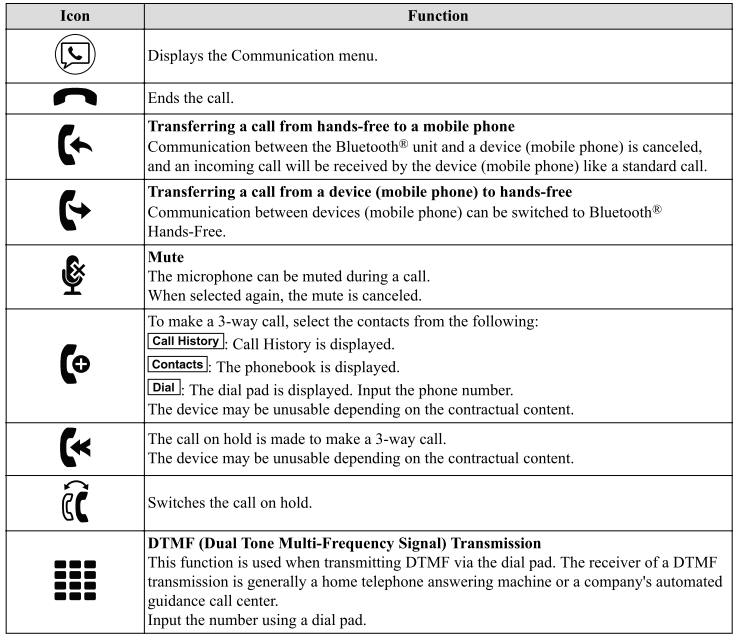
The following icons are displayed on the screen during a call. Icons which can be used differ depending on use conditions.
NOTE
- If the ignition is switched off during a hands-free call, the line is transferred to the device (Mobile phone) automatically.
- If the DTMF code has two or more digits or symbols, each one must be transmitted individually.
 Making a Call
For Mazda Connect, making calls is
possible using any of the following six
methods:
Phonebook downloaded from
Bluetooth® device (mobile phone)
(voice recognition function can be used)
Favorites
Call record
Dialing a telephone number (voice
recognition function can be used)
“Redial” - Voice recognition command
for making a call to the latest outgoing
call record...
 Call Interrupt
A call can be interrupted to receive an
incoming call from a third party.
When is selected or the
pick-up button on the steering wheel is
pressed, the current call is held and the
system switches to the new incoming call...
Other information:
Mazda CX-3 (2015-2026) Owner's Manual: AUX/USB mode
Audio can be heard from the vehicle's speakers by connecting a commercially-available portable audio unit to the auxiliary jack. A commercially-available, non-impedance stereo mini plug cable is required. Contact an Authorized Mazda Dealer for details...
Mazda CX-3 (2015-2026) Owner's Manual: Pregnant Women and Persons with Serious Medical Conditions
Pregnant women should always wear seat belts. Ask your doctor for specific recommendations. The lap belt should be worn SNUGLY AND AS LOW AS POSSIBLE OVER THE HIPS. The shoulder belt should be worn across your shoulder properly, but never across the stomach area...
Categories
- Manuals Home
- Mazda CX-3 Owners Manual
- Mazda CX-3 Service Manual
- When Driving
- Specifications
- Recommended Oil
- New on site
- Most important about car
Outside Mirrors
WARNING
Be sure to look over your shoulder before changing lanes:
Changing lanes without taking into account the actual distance of the vehicle in the convex mirror is dangerous. You could have a serious accident. What you see in the convex mirror is closer than it appears.
Mirror type
Flat type (driver's side)
