
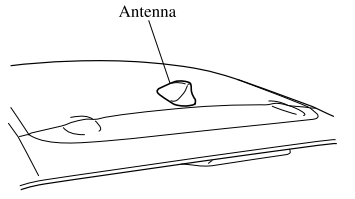
Mazda CX-3: Before Using the Audio System / Antenna
 AUX/USB mode
Audio can be heard from the vehicle's
speakers by connecting a
commercially-available portable audio
unit to the auxiliary jack.
A commercially-available, non-impedance
stereo mini plug cable is required...

Other information:
Mazda CX-3 (2015-2026) Owner's Manual: Leaving Home Light
The leaving home light turns on the lights when the transmitter unlock button is pressed while away from the vehicle. The following lights turn on when the leaving home light is operated. Low beams, Parking lights, Taillights, License plate lights...
Mazda CX-3 (2015-2026) Owner's Manual: Selection from station list
Selection can be made from a programmed radio station list. Select the icon. Select the desired radio station. NOTE When is selected, songs randomly selected from the radio station list are played. Selecting the sort method The displayed order of the station list can be changed...
Categories
- Manuals Home
- Mazda CX-3 Owners Manual
- Mazda CX-3 Service Manual
- Warning Lights
- Engine Start Function When Key Battery is Dead
- Daytime Running Lights
- New on site
- Most important about car
Anchor Bracket
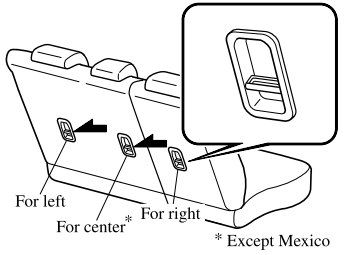
Anchor brackets for securing child-restraint systems are equipped in the vehicle. Locate each anchor position using the illustration.
To install a child-restraint system, remove the head restraint. Always follow the instruction manual accompanying the child-restraint system.
Anchor bracket location
Use the indicated anchor bracket locations when installing a child-restraint system equipped with a tether.

Copyright © 2026 www.macx3.net