
Mazda CX-3: Bluetooth® Preparation / Changing PIN code
Mazda CX-3 (2015-2026) Owner's Manual / Interior Features / Audio Set [Type B (touchscreen)] / Bluetooth® Preparation / Changing PIN code
PIN code (4 digits) can be changed.
- Select the
 icon on the home
screen
to display the Settings screen.
icon on the home
screen
to display the Settings screen. - Select the
 tab.
tab. - Select
 .
. - Select
 .
. - Select
 .
. - Input the new PIN code to be set.
- Select
 .
.
 Deleting a device
Selecting and deleting devices
Select the icon on the
home screen
to display the Settings screen.
Select the tab.
Select .
Turn the Bluetooth® setting on...

Other information:
Mazda CX-3 (2015-2026) Owner's Manual: Mazda Radar Cruise Control with Stop & Go function (MRCC with Stop & Go function) (Some models)
The MRCC with Stop & Go function system is designed to maintain headway control*1 with a vehicle ahead according to your vehicle's speed using a radar sensor (front) to detect the distance to the vehicle ahead and a preset vehicle speed without you having to use the accelerator or brake pedals...
Mazda CX-3 (2015-2026) Owner's Manual: Emission Control System
This vehicle is equipped with an emission control system (the catalytic converter is part of this system) that enables the vehicle to comply with existing exhaust emissions requirements. WARNING Never park over or near anything flammable: Parking over or near anything flammable, such as dry grass, is dangerous...
Categories
- Manuals Home
- Mazda CX-3 Owners Manual
- Mazda CX-3 Service Manual
- Identification Numbers
- Odometer, Trip Meter and Trip Meter Selector (Some models)
- Headlights
- New on site
- Most important about car
Fuel Gauge
The fuel gauge shows approximately how much fuel is remaining in the tank when the ignition is switched ON. We recommend keeping the tank over 1/4 full.
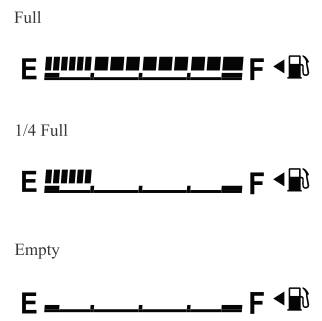
If the low fuel warning light illuminates or the fuel level is very low, refuel as soon as possible.
If inconsistency in engine performance or stalling occurs due to low fuel level conditions, refuel the vehicle as soon as possible and add at least 10 L (2.7 US gal, 2.2 Imp gal) of fuel. Refer to Taking Action.

Copyright © 2026 www.macx3.net