
Mazda CX-3: Wiper Blades / Replacing Windshield Wiper Blades
When the wipers no longer clean well, the blades are probably worn or cracked. Replace them.
CAUTION
To prevent damage to the wiper arms and other components, do not try to sweep the wiper arm by hand.
NOTE
When raising both windshield wiper arms, raise the driver's side wiper arm first. When lowering the wiper arms, slowly lower the wiper arm from the passenger's side first while supporting it with your hand. Forcefully lowering the wiper arms could damage the wiper arm and blade, and may scratch or crack the windshield.
Replace the wiper blades using the following procedure.
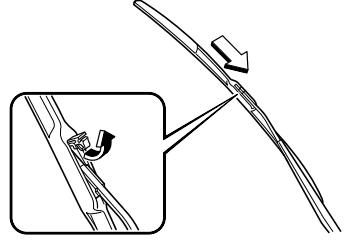
- Raise the wiper arm.
- Open the clip and slide the blade
assembly in the direction of the arrow.
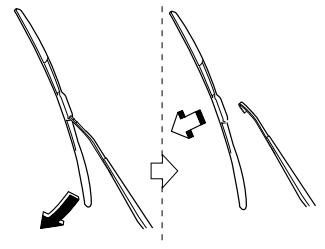
- Tilt the blade assembly and remove it
from the arm.
CAUTION
To prevent damage to the windshield let the wiper arm down easily, do not let it slap down on the windshield.
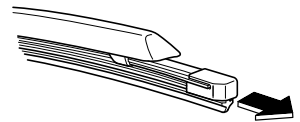
- Pull down the blade rubber and slide it
out of blade holder.
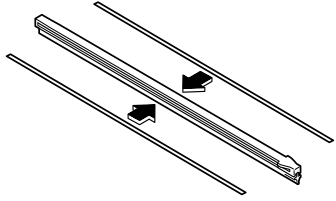
- Remove the metal stiffeners from each
blade rubber and install them in the
new blade.
CAUTION
Do not bend or discard the stiffeners. You need to use them again.
If the metal stiffeners are switched, the blade's wiping efficiency could be reduced.
So do not use the driver's side metal stiffeners on the passenger's side, or vice versa.
Be sure to reinstall the metal stiffeners in the new blade rubber so that the curve is the same as it was in the old blade rubber.
- Carefully insert the new blade rubber.
Then install the blade assembly in the
reverse order of removal.
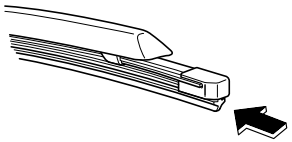
 Wiper Blades
CAUTION
Hot waxes applied by automatic car
washers have been known to affect the
wiper's ability to clean windows.
To prevent damage to the wiper blades,
do not use gasoline, kerosene, paint
thinner, or other solvents on or near
them...
 Replacing Rear Window Wiper Blade
When the wiper no longer cleans well, the
blade is probably worn or cracked.
Replace it.
CAUTION
To prevent damage to the wiper arm and
other components, do not move the wiper
by hand...
Other information:
Mazda CX-3 (2015-2026) Owner's Manual: Rear Window Wiper and Washer
The ignition must be switched ON to use the wiper. Rear Window Wiper Turn the wiper on by turning the rear wiper/washer switch. Rear Window Washer To spray washer fluid, turn the rear wiper/ washer switch to either of the position. After the switch is released, the washer will stop...
Mazda CX-3 (2015-2026) Owner's Manual: Control Switches
Temperature control dial This dial controls temperature. Turn it clockwise for hot and counterclockwise for cold. Fan control dial The fan has seven speeds. AUTO position The amount of airflow will be automatically controlled in accordance with the set temperature...
Categories
- Manuals Home
- Mazda CX-3 Owners Manual
- Mazda CX-3 Service Manual
- Recommended Oil
- Auto Lock/Unlock Function
- Headlights
- New on site
- Most important about car
Outside Mirrors
WARNING
Be sure to look over your shoulder before changing lanes:
Changing lanes without taking into account the actual distance of the vehicle in the convex mirror is dangerous. You could have a serious accident. What you see in the convex mirror is closer than it appears.
Mirror type
Flat type (driver's side)
