
Mazda CX-3: Audio Set [Type A (non-touchscreen)] / Bluetooth® Preparation
Mazda CX-3 (2015-2026) Owner's Manual / Interior Features / Audio Set [Type A (non-touchscreen)] / Bluetooth® Preparation
- Bluetooth® Hands-Free Preparation
- Device pairing (Bluetooth® Hands-Free)
- Device selection (Bluetooth® Hands-Free)
- Deleting a device (Bluetooth® Hands-Free)
- Registered device editing (Bluetooth® Hands-Free)
- Bluetooth® Audio Preparation
- Bluetooth® audio device pairing (Bluetooth® Audio)
- Device selection (Bluetooth® Audio)
- Deleting a device (Bluetooth® Audio)
- Bluetooth® audio device information display
 Component Parts
Audio unit
Talk button, Pick-up button and Hang-up button
Microphone
Microphone (hands-free)
The microphone is used for speaking voice commands or when making a
Hands-free call...
 Bluetooth® Hands-Free Preparation
Pairing code setting
The 4-digit pairing code setting for
registration of your cell phone (pairing)
can be set beforehand.
NOTE
The initial setting value is “0000”...
Other information:
Mazda CX-3 (2015-2026) Owner's Manual: Bright-Metal Maintenance
Use tar remover to remove road tar and insects. Never do this with a knife or similar tool. To prevent corrosion on bright-metal surfaces, apply wax or chrome preservative and rub it to a high luster. During cold weather or in coastal areas, cover bright-metal parts with a coating of wax or preservative heavier than usual...
Mazda CX-3 (2015-2026) Owner's Manual: Locking, Unlocking with Transmitter and Door-Lock Switch
Locking, Unlocking with Transmitter All doors and the liftgate can be locked/ unlocked by operating the keyless entry system transmitter, refer to Keyless Entry System. Locking, Unlocking with Door-Lock Switch All doors and the liftgate lock automatically when the lock side is pressed...
Categories
- Manuals Home
- Mazda CX-3 Owners Manual
- Mazda CX-3 Service Manual
- Identification Numbers
- Auto Lock/Unlock Function
- Warning Lights
- New on site
- Most important about car
Opening and Closing the Liftgate
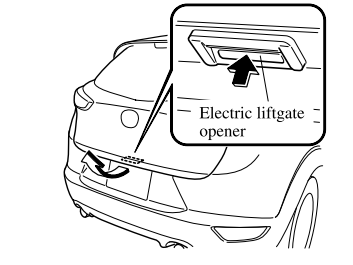
Opening the liftgate with Electric liftgate opener
Unlock the doors and liftgate, then press the electric liftgate opener on the liftgate and raise the liftgate when the latch releases.

Copyright © 2026 www.macx3.net