
Mazda CX-3: Instrument Cluster and Display / Meters and Gauges
Mazda CX-3 (2015-2026) Owner's Manual / When Driving / Instrument Cluster and Display / Meters and Gauges
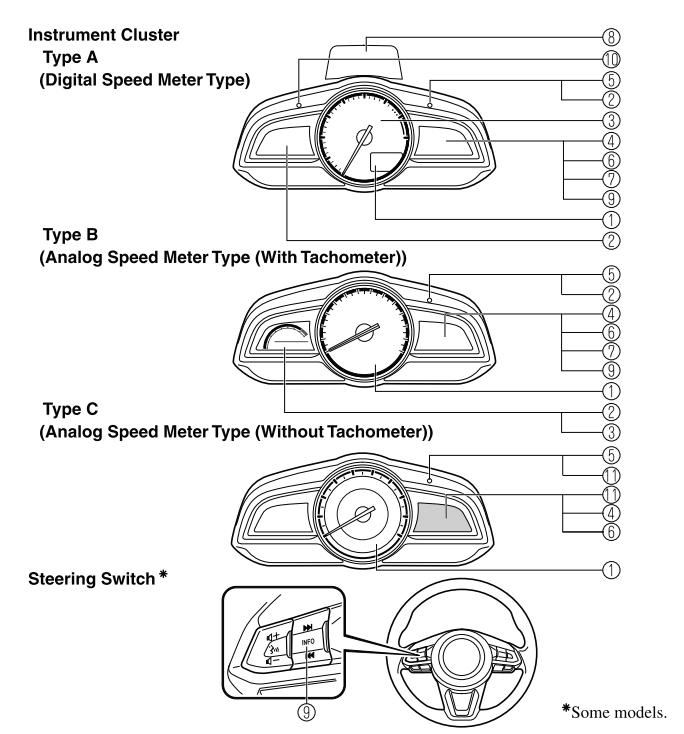
- Speedometer
- Odometer, Trip Meter and Trip Meter Selector
- Tachometer
- Fuel Gauge
- Dashboard Illumination
- Outside Temperature Display
- Cruise Control Set Vehicle Speed Display
- Active Driving Display
- Trip Computer and INFO Switch
- Speed Unit Selector
- Odometer, Trip Meter, Trip Computer and Trip Meter Selector
- Speedometer
- Odometer, Trip Meter and Trip Meter Selector (Some models)
- Odometer, Trip Meter, Trip Computer and Trip Meter Selector (Some models)
- Tachometer (Some models)
- Fuel Gauge
- Dashboard Illumination
- Outside Temperature Display
- Cruise Control Set Vehicle Speed Display (Some models)
- Trip Computer and INFO Switch (Some models)

 Speedometer
The speedometer indicates the speed of the vehicle.
NOTE
(Analog speedometer type)
If a few seconds have elapsed after
switching the ignition off, the needle may
deviate...
Other information:
Mazda CX-3 (2015-2026) Owner's Manual: Owner Maintenance Precautions
The owner or a qualified service technician should make these vehicle inspections at the indicated intervals to ensure safe and dependable operation. Bring any problem to the attention of an Authorized Mazda Dealer or qualified service technician as soon as possible...
Mazda CX-3 (2015-2026) Owner's Manual: Variance Between Actual Road Conditions and Displayed Image
Some variance occurs between the actual road and the displayed road. Such variance in distance perspective could lead to an accident. Note the following conditions that may cause a variance in distance perspective. When the vehicle is tilted due to the weight of passengers and load When the vehicle rear is lowered, the object displayed on the screen appears farther than the actual distance...
Categories
- Manuals Home
- Mazda CX-3 Owners Manual
- Mazda CX-3 Service Manual
- How to use the Android Auto™ mode
- Indicator Lights
- Daytime Running Lights
- New on site
- Most important about car
Operational Range
The system operates only when the driver is in the vehicle or within operational range while the key is being carried.
NOTE
When the battery power is low, or in places where there are high-intensity radio waves or noise, the operational range may become narrower or the system may not operate. For determining battery replacement, Refer to Keyless Entry System.

Copyright © 2026 www.macx3.net