
Mazda CX-3: SRS Air Bags / SRS Air Bag Deployment Criteria
This chart indicates the applicable SRS equipment that will deploy depending on the type of collision.
(The illustrations are the representative cases of collisions.)
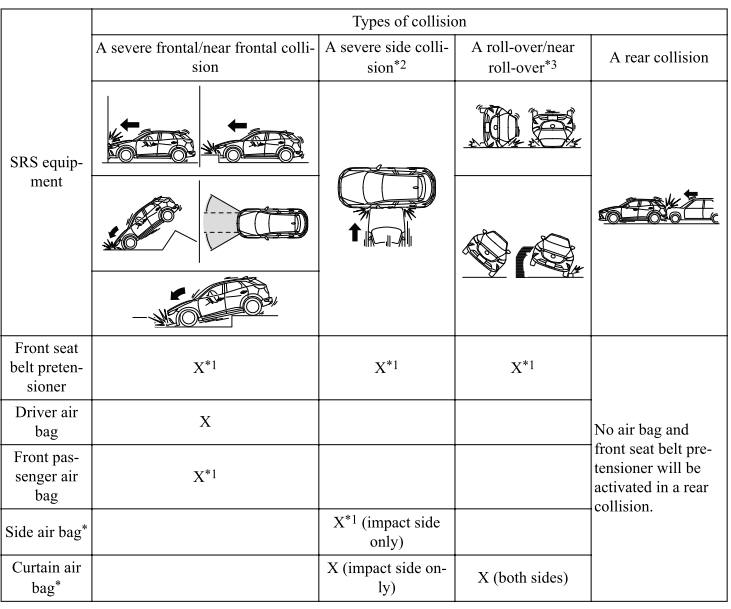
X: The SRS air bag equipment is designed to deploy in a collision.
*1 (With Front Passenger Occupant Classification System)
The front passenger front and side air bags and the seat belt pretensioner are designed to deploy when the front passenger occupant classification sensor detects a passenger sitting on the front passenger's seat.
*2 (With Side/Curtain Air Bags)
In a side collision, the seat belt pretensioners and the side/curtain air bags deploy.
*3 (With Front Passenger Occupant Classification System)
In a roll-over accident, the seat belt pretensioners and the curtain air bags deploy.
NOTE
In a frontal offset collision, the equipped air bags and pretensioners may all deploy depending on the direction, angle, and rate of impact.
 How the SRS Air Bags Work
Your Mazda is equipped with the following types of SRS air bags. SRS air bags
are
designed to work together with the seat belts to help to reduce injuries during
an accident...
 Limitations to SRS Air Bag
In severe collisions such as those described previously in "SRS Air Bag
Deployment
Criteria", the applicable SRS air bag equipment will deploy. However, in some
accidents,
the equipment may not deploy depending on the type of collision and its severity...
Other information:
Mazda CX-3 (2015-2026) Owner's Manual: Call Interrupt
A call can be interrupted to receive an incoming call from a third party. When is selected or the pick-up button on the steering wheel is pressed, the current call is held and the system switches to the new incoming call. When is selected, the current call is ended and the system switches to the new incoming call (GSM network only)...
Mazda CX-3 (2015-2026) Owner's Manual: Taking Action
Take the appropriate action and verify that the warning light turns off. Tire Pressure Monitoring System Warning Light (Turns on)(Some models) Take the appropriate action and verify that the warning light turns off. KEY Warning Light Take the appropriate action and verify that the warning light turns off...
Categories
- Manuals Home
- Mazda CX-3 Owners Manual
- Mazda CX-3 Service Manual
- Key Battery Replacement
- Daytime Running Lights
- Exterior Overview
- New on site
- Most important about car
Outside Mirrors
WARNING
Be sure to look over your shoulder before changing lanes:
Changing lanes without taking into account the actual distance of the vehicle in the convex mirror is dangerous. You could have a serious accident. What you see in the convex mirror is closer than it appears.
Mirror type
Flat type (driver's side)
